Watch RNAi on PBS. See more from NOVA scienceNOW.
Thursday, January 05, 2012


Wednesday, December 28, 2011
Calling a perl subroutine from PHP scripts
I spent a good part of my Christmas vacation in figuring out how to call a perl subroutine from a PHP script. There are several reasons why you would like to do that. The first and foremost may be because you don't want to replicate all your perl subroutines to PHP in order to use it. The other issues may be incompatibilities. The one I face is on incompatibility of my PHP version to run oracle queries which can only be solved at the sys admin level.On the other hand the perl/CGI interface for oracle just works fine.
There are 3 levels this task can be achieved:
1. We will see how to pass absolute values to perl subroutines.
2. Pass variables to perl subroutines and
3. Collect return values from the perl subroutine
Following are some points to be remembered:
1. If your perl subroutines are packed into perl packages then they are good to go (e.g; The file should begin with a package "name"; header and the end of the file should have a 1; )
2. Do not use <include "package name"> inside the PHP script.
3. Initialize a string with perl commands e.g; $command='perl -MpackageName -e "packageName::subroutine(arg,arg,arg)"'
4. Call system($command); from the php script. Do not use backticks (`)
Here is an example of passing absolute value to perl subroutine:
##Package Test ###
#!usr/bin/perl -w
package Test;
sub printNames
{
my $name1 = shift;
my $name2 = shift;
print "The names are $name1 and $name2\n";
}
1;
## save it as Test.pm
Level1: Passing an absolute value into the perl subroutine:
# test.php
<?
$command='perl -MTest -e "Test::printNames(Guest1,Guest2)"';
system($command);
?>
#Open browser and run test.php :
The names are Guest1 and Guest2
Level2: Passing a PHP variable into the perl subroutine:
<?
$arg ="guest1 and guest2";
$arg1 ="guest3 and guest4";
$command = "perl -MTest -e 'Test::printNames("$arg","$arg1")'";
system($command);
?>
# Open browser and run the command:
The names are guest1 and guest2 and guest3 and guest4
Level3: Collecting the return values from perl subroutine as PHP array
Instead of running PHP "system" command, run "exec". Print the outputs from inside the perl subroutine, that can be captured by exec. Now the perl subroutine will undergo slight modification:
##Package Test ###
#!usr/bin/perl -w
package Test;
sub calculateVal
{
my $val1 = shift;
my $val2 = shift;
$val1 *= 20;
$val2 /= 3;
print $val1;
print $val2;
}
1;
---
<?
$arg =10;
$arg1 =300;
$command = "perl -MTest -e 'Test::printVal($arg,$arg1)'";
$out = array();
$tmp = exec($command,$out);
print_r($out);
?>
# Output
Array
(
[0] => 200
[1] => 100
)
NOTE: Multidimensional perl arrays can also be passed by printing the value from inside the perl subroutine.
There are 3 levels this task can be achieved:
1. We will see how to pass absolute values to perl subroutines.
2. Pass variables to perl subroutines and
3. Collect return values from the perl subroutine
Following are some points to be remembered:
1. If your perl subroutines are packed into perl packages then they are good to go (e.g; The file should begin with a package "name"; header and the end of the file should have a 1; )
2. Do not use <include "package name"> inside the PHP script.
3. Initialize a string with perl commands e.g; $command='perl -MpackageName -e "packageName::subroutine(arg,arg,arg)"'
4. Call system($command); from the php script. Do not use backticks (`)
Here is an example of passing absolute value to perl subroutine:
##Package Test ###
#!usr/bin/perl -w
package Test;
sub printNames
{
my $name1 = shift;
my $name2 = shift;
print "The names are $name1 and $name2\n";
}
1;
## save it as Test.pm
Level1: Passing an absolute value into the perl subroutine:
# test.php
<?
$command='perl -MTest -e "Test::printNames(Guest1,Guest2)"';
system($command);
?>
#Open browser and run test.php :
The names are Guest1 and Guest2
Level2: Passing a PHP variable into the perl subroutine:
<?
$arg ="guest1 and guest2";
$arg1 ="guest3 and guest4";
$command = "perl -MTest -e 'Test::printNames("$arg","$arg1")'";
system($command);
?>
# Open browser and run the command:
The names are guest1 and guest2 and guest3 and guest4
Level3: Collecting the return values from perl subroutine as PHP array
Instead of running PHP "system" command, run "exec". Print the outputs from inside the perl subroutine, that can be captured by exec. Now the perl subroutine will undergo slight modification:
##Package Test ###
#!usr/bin/perl -w
package Test;
sub calculateVal
{
my $val1 = shift;
my $val2 = shift;
$val1 *= 20;
$val2 /= 3;
print $val1;
print $val2;
}
1;
---
<?
$arg =10;
$arg1 =300;
$command = "perl -MTest -e 'Test::printVal($arg,$arg1)'";
$out = array();
$tmp = exec($command,$out);
print_r($out);
?>
# Output
Array
(
[0] => 200
[1] => 100
)
NOTE: Multidimensional perl arrays can also be passed by printing the value from inside the perl subroutine.
Thursday, October 20, 2011
Installing SQL Developer
This is slightly offtopic for this blog, but nevertheless a very important one. I have decided to blog this one becuase this particular problem dragged for atleast few days for me and after surfing countless number of sites and installing various softwares including harmful ones, I learnt the hard way how to tackle it.
If you have a 64 bit windows7 machine and you are trying your luck installing SQL Developer and failing consistently, this post is for you.
SQL developer is available at the oracle site here http://www.oracle.com/technetwork/developer-tools/sql-developer/downloads/index.html. However, this version does not come with a compatible java version. You may already have java installed in your machine, if not, you may need to follow the instructions from the above mentioned site on how to install java.
After you downloaded and unpacked SQL Developer, when you click on the sqldeveloper.exe file, it may say "permission denied". This may be because the executable file may not have execution permission. You may like to change that with a chmod 755 <filename> . Then click on the executable file sqldeveloper.exe . It may possibly ask you the java path if it does not find one, just provide the path through the browse button option. I was stuck when the program complained about absence of msvcr100.dll and jvm.dll files . I browsed countless number of sites and in that process installed a melaware and ended up cleaning it later. Be aware, don't download .dll files from anywhere other than safe places. I looked for resources that asked me to download .NET and visual C++ that could solve the lingering msvcr100.dll problem but in vein. I have installed uninstalled .NET and visual C++ few times at least to make sure that the softwares are installed correctly, but that did not work. Since it was looking for this file from Java, I checked the java distribution and finally located it under ProgramsFiles/Java/jdk.7.0_01/bin/ . Copy pasted it under Windows/system32/ . For jvm.dll, many sites including the java site advised that probably the java installation was incorrect. I re-installed java several times after each un-install and it still did not work. Finally I found a safe site at https://rt4.cceb.med.upenn.edu/crcu_html/jinit/jinit_download.htm , from where I downloaded jvm.dll. Copy pasted this file under Windows/system32 and it solved the problem!!
If you have a 64 bit windows7 machine and you are trying your luck installing SQL Developer and failing consistently, this post is for you.
SQL developer is available at the oracle site here http://www.oracle.com/technetwork/developer-tools/sql-developer/downloads/index.html. However, this version does not come with a compatible java version. You may already have java installed in your machine, if not, you may need to follow the instructions from the above mentioned site on how to install java.
After you downloaded and unpacked SQL Developer, when you click on the sqldeveloper.exe file, it may say "permission denied". This may be because the executable file may not have execution permission. You may like to change that with a chmod 755 <filename> . Then click on the executable file sqldeveloper.exe . It may possibly ask you the java path if it does not find one, just provide the path through the browse button option. I was stuck when the program complained about absence of msvcr100.dll and jvm.dll files . I browsed countless number of sites and in that process installed a melaware and ended up cleaning it later. Be aware, don't download .dll files from anywhere other than safe places. I looked for resources that asked me to download .NET and visual C++ that could solve the lingering msvcr100.dll problem but in vein. I have installed uninstalled .NET and visual C++ few times at least to make sure that the softwares are installed correctly, but that did not work. Since it was looking for this file from Java, I checked the java distribution and finally located it under ProgramsFiles/Java/jdk.7.0_01/bin/ . Copy pasted it under Windows/system32/ . For jvm.dll, many sites including the java site advised that probably the java installation was incorrect. I re-installed java several times after each un-install and it still did not work. Finally I found a safe site at https://rt4.cceb.med.upenn.edu/crcu_html/jinit/jinit_download.htm , from where I downloaded jvm.dll. Copy pasted this file under Windows/system32 and it solved the problem!!
Monday, October 17, 2011
RGS14 - The protein that makes us forget
In this months protein spotlight issue, there is a protein, RGS14 highlighted that makes us filter our memory. Do we not need something that will make us remember things rather forget them? Well, too much un-necessary information stored in brain will certainly make it more chaotic. However, silencing RGS14 in mice makes them smarter, I wonder if same can be said about humans.
The full article is available here http://web.expasy.org/spotlight/pdf/132/
The full article is available here http://web.expasy.org/spotlight/pdf/132/
Thursday, September 22, 2011
To or Not to with cufflink:
Cufflink is an amazingly easy to install and use software, that lured me into using it. However, it is not without its sets of pitfalls... I am still researching on the illusive nature of the outputs from this software.
this software and the types of outputs it produces using different commands:
Here are few things to keep in mind before trying to run cufflink
1. Cufflink can be run on sorted bam files/ sam files.
2. It can run in multi-threading mode with a -p option and is much faster than single threading mode.
3. The new cuffmerge program first converts your gtf files derived from cuffcompare to sam files, merges them, sorts them, runs cufflink on them with a set of hard coded parameters and then runs cuffcompare on the finally to give you your merged.gtf file.
[The cufflink commandline option: cufflinks -o ./merged_asm/ -F 0.05 -q --overhang-tolerance 200 --library-type=transfrags -A 0.0 --min-frags-per-transfrag 0 --no-5-extend -p 16 ./merged_asm/tmp/mergeSam_filewvcXTG.]
Earlier, I used a route as follows:
1. Run cufflink on each of the libraries with a reference gtf and without a reference gtf.
2. Merge the outputs separately using cuffcompare on, with and without reference gtf and merge the output with a script to indicate which of the transcripts are represented by a gene id. But the potential pitfall with this approach is the overlapping and shorter transcripts. This clearly is a stumbling block when you are trying to produce an assembled transcript.
In the recent cufflink versions, there is a accessory program called as cuffmerge, which the manual suggests for merging the individual gtfs. As I have mentioned earlier, this is again a wrapper, that internally calls cufflink and cuffcompare, albeit with several options already pre-set. So, what I did was, merged the bam files generated from different libraries, merged them with samtools, sorted with samtools and derived sam files from the sorted bam for running cufflink [ Please note running the same sorted sam files with a reference gtf file suggests it is not sorted, where as without a gtf file runs fine..]
Output files
with reference gtf:
genes.fpkm.tracking -> has no fpkm information
transcripts.gtf -> has fpkm column but meaningless (all 0.0000)
isoforms.fpkm_tracking -> similar in size and content with genes.fpkm.tracking
Without reference gtf:
transcripts.gtf -> has transcript and exon information with fpkm and cov values; the co-ordinates are 1 based.
genes.fpkm.tracking -> has gene info with fpkm. The co-ordinates are 0 based
isoform.fpkm_tracking -> same as genes.fpkm.tracking
Comparison between all-merged-sam with cufflink VS cufflink -> gtf -> cuffcompare:
1. In both the cases, only a single exon is reported per gene(Since cufflink is run after bowtie directly without running tophat, this may be the case).
2. Much less number of transcripts are found in the first case, and they are non-overlapping and larger than the later case, where the transcripts are short, overlapping. The FPKM is slightly higher than the FPKM values in the later case. The first one seems to merge several smaller transcripts together.
So, in essence, if you have various biological replicates of a single treatment type, instead of going through the path of running them individually with cufflink, followed by merging the results with cuffmerge, merge the map bam files first and follow this route. The FPKM values are much accurate in this case...
Wednesday, September 14, 2011
Regulatory regions under represented with NGS methods
My new blog post on this subject can be found at SAB blogger web site at:
http://products.scienceboard.net/index.php/archives/2011/09/13/916/
http://products.scienceboard.net/index.php/archives/2011/09/13/916/
Thursday, September 08, 2011
JavaScript: Changing drop down Lists
 |
| The select menu should work something like this. Change the first list and the second list also changed |
Although this is a very small javascript trick, but nevertheless a very useful one! While creating forms, you would sometimes like to change a drop down list dynamically depending on which option was chosen in a earlier list(This may be a radio button, a list itself or anything else)
Here is a step by step procedure:
1. Write down the names and values for first drop down box e.g; Psojae V1-> name, psv1 -> value; Psojae V5-> name, psv5-> value and so on...
2. For each name in first drop down list, make a sublist of name value pairs, you want to appear on select: for example, for Psojae V1: PS1->name; ps1->value; PS2->name; ps2->value AND for Psojae V4: WI1->name; wi1->value; WI2->name; wi2->value.
3. Now write a javascript with all these primary lists and sublist name value pairs something like this:
<script language="javascript">
var lists = new Array();
//First List
lists['psv5'] = new Array(); // Notice here you are making a list with the value of first list
lists['psv5'][0] = new Array( // These are the names you want to appear on the second list
'WI1',
'WI2'
);
lists['psv5'][1] = new Array( //These are the values you want to pass on from the second list
'wi1',
'wi2'
);
//Second List
lists['psv1'] = new Array(); // Notice here you are making a list with the value of first list
lists['psv1'][0] = new Array( // These are the names you want to appear on the second list
'PS1',
'PS2'
);
lists['psv1'][1] = new Array( //These are the values you want to pass on from the second list
'ps1',
'ps2'
);
4. Write the second sets of javascripts having functions like:
emptyList, fillList and changeList
function emptyList( box ) {
while ( box.options.length ) box.options[0] = null;
}
function fillList( box, arr ) {
for ( i = 0; i < arr[0].length; i++ ) {
option = new Option( arr[0][i], arr[1][i] );
box.options[box.length] = option;
}
box.selectedIndex=0;
}
function changeList( box ) {
list = lists[box.options[box.selectedIndex].value];
emptyList( box.form.reads ); // Here notice I have given name 'reads' for the form object
fillList( box.form.reads, list ); // that is the name tag on the select object in html for the second list
}
</script>
5. Now add the following to the body tag of your html page:
<body onload="changeList(document.forms['nextgen'].reference)"> // Here 'nextgen' is the name of the form. Notice, I add this trigger when the form gets loaded to execute changeList().
The page will be fine at this stage, only problem is you have to refresh it after making a select on the first select drop down. If you don't want that do this last thing:
6. Write the following on the first select tag:
<select name="reference" size=1 onchange="changeList(this)">
In case, you want to be able to select multiple values from a select list(by shift + ctrl), go ahead and add the following to your second select tab:
<select name="reads" size=N multiple width=M>
Enjoy with javascript!
Thursday, August 25, 2011
Monday, August 08, 2011
String matching algorithms - An overview
String matching algorithms are the most commonly used algorithms in sequence analysis. While we care less about the underlying principle that does the hard work for us, we remain elusive about the output. It helps a great deal if students get to know the algorithm that forms the basis of a search program. Here is a great link that illustrates various algorithms underlying the string search principle along with the C pseudo code. Enjoy...
http://igm.univ-mlv.fr/~lecroq/string/index.html
http://igm.univ-mlv.fr/~lecroq/string/index.html
Friday, July 15, 2011
Department of defense Ovarian cancer award proposal
My collaborator Prof. Alka Nanda Basu from UNT health Science Center and I go to the same Zumba class. Once while talking, we both discovered that we both are in science and could be potential collaborators. Alaka invited me to present my work at UNT and it was very well received. Since then we have been working together on few grants. One of grant proposal on OCRP from DOD got green signal and we are all set to write the full proposal. As exciting as this news is, another exciting news came from one of her summer students who worked on role of AMP activated Protein Kinase(AMPK) on cancer cells developing resistance to drug cisplatin. The hypothesis that led to a prestigious google award can be summarized as:
AMPK inhibition may decrease cisplatin resistance in ovarian cancer cells that are resistant to the drug.
More on google award can be found at google web site at:
AMPK inhibition may decrease cisplatin resistance in ovarian cancer cells that are resistant to the drug.
Friday, June 17, 2011
Feeding twitter rolls into your web site
This is the simplest way you could start feeding twitter rolls of your interest into your web site, just replace the word1, word2... with your suitable key words.
<script>
new TWTR.Widget({
version: 2,
type: 'search',
search: 'Word1 OR word2 OR word3 OR word4',
interval: 6000,
title: 'Oomycetes tweet feed',
subject: 'Tweet Feed',
width: 250,
height: 300,
theme: {
shell: {
background: '#8ec1da',
color: '#ffffff'
},
tweets: {
background: '#ffffff',
color: '#444444',
links: '#1985b5'
}
},
features: {
scrollbar: false,
loop: true,
live: true,
hashtags: true,
timestamp: true,
avatars: true,
toptweets: true,
behavior: 'default'
}
}).render().start();
</script>
<script>
new TWTR.Widget({
version: 2,
type: 'search',
search: 'Word1 OR word2 OR word3 OR word4',
interval: 6000,
title: 'Oomycetes tweet feed',
subject: 'Tweet Feed',
width: 250,
height: 300,
theme: {
shell: {
background: '#8ec1da',
color: '#ffffff'
},
tweets: {
background: '#ffffff',
color: '#444444',
links: '#1985b5'
}
},
features: {
scrollbar: false,
loop: true,
live: true,
hashtags: true,
timestamp: true,
avatars: true,
toptweets: true,
behavior: 'default'
}
}).render().start();
</script>
Thursday, April 21, 2011
Easing the informatics bottleneck for transcript alignment and assembly for RNAseq data
My new blog post in Scientific Advisory Board..
http://products.scienceboard.net/index.php/archives/2011/04/21/671/
http://products.scienceboard.net/index.php/archives/2011/04/21/671/
Monday, March 21, 2011
Analyzing oomycetes RNAseq data - Part 1
This is a small tutorial on how to work with large scale RNAseq data with open source softwares. I will be discussing various options for alignment of reads to the reference sequence and little bit on assembly.
[When I started writing this post, tophat did not have colorspace support, but now it does]
A quicklist of software programs available for nextgen data analysis can be found here:
To begin with bowtie, get the pre compiled binaries from here .
In order to start with bowtie, you need to build index of your reference sequence. This could be typically a fasta file. For me running command . "./bowtie-build /data/vbi/references/p_sojae.fasta sojaeV4"
to generate index for a 70 MB genome in a 64 bit machine with dual core and 8 GB chip - took exactly 2 minutes. This command will generate 6 .ebwt files in the working directory.
ls -l
Once created make a separate directory called as index/ in the same working area and place all these files in there.
Test installation of index using the following command:
./bowtie -c index/sojaeV4 ATGGCCGCGAAAAGGTTTCTGAGACGCAACAAG
and withing fraction of a second you will see following printed to the stdout
0 - super_16 1314431 CTTGTTGCGTCTCAGAAACCTTTTCGCGGCCATIIIIIII
IIIIIIIIIIIIIIIIIIIIIIIIII 0
# reads processed: 1
# reads with at least one reported alignment: 1 (100.00%)
# reads that failed to align: 0 (0.00%)
Reported 1 alignments to 1 output stream(s)
Good thing about bowtie(version 0.12 onwards, it supports colorspace alignment)
Some reads include a primer base as the first character; e.g.:

Caveats: I work with oomycetes pathogens and the introns and exons in this pathogen could be really much smaller than what tophat defines as default.
Running tophat may not work for everyone. For example with P.sojae, tophat produced awful number of junctions(just 700) with default parameters. Tweaking the parameters only produced worse results. As a work around, we tried aligning these transcripts to the predicted gene models as well. Comparing genome vs predicted gene model alignment results, we found around 10% of the alignments were not translated into predicted models(55% matched with genomes where as 45% match with predicted transcripts)
There is an option to try and get the sequences aligned with the genome to assemble into contigs. One easier method for this is to try ABySS
Running ABySS is quite straight forward. Unpack the distribution and follow installation instructions. Once installed you could try running ABySS with different k mers. One small shell script for running different k mers
is as belows:
export PATH=$PATH:/home/sutripa/samtools-0.1.11/
for i in {20..40};
do
./ABYSS -k $i /data/bowtieOutput/PS-1_F3V1.bam.sorted.bam -o tmp-k$i.fa
done
[NOTE: Here the input file for assembly is sorted bam files. The bam files are generated by running bowtie]
Then check the files for their N50 values [See N50 section of the blog on how to calculate N50 values]
In case of P.sojae here is the N50 results:

N50 Vs Number of scaffolds having values larger than N50 for P.sojae.
Here, the results are not very encouraging. So, you may try running with a bunch of different k values. I will discuss about running trans-abyss and cufflink in part - 2 of this series.
[When I started writing this post, tophat did not have colorspace support, but now it does]
A quicklist of software programs available for nextgen data analysis can be found here:
To begin with bowtie, get the pre compiled binaries from here .
In order to start with bowtie, you need to build index of your reference sequence. This could be typically a fasta file. For me running command . "./bowtie-build /data/vbi/references/p_sojae.fasta sojaeV4"
to generate index for a 70 MB genome in a 64 bit machine with dual core and 8 GB chip - took exactly 2 minutes. This command will generate 6 .ebwt files in the working directory.
ls -l
26385951 2010-06-11 15:18 sojaeV4.1.ebwt
9702096  2010-06-11 15:18 sojaeV4.2.ebwt
8711     2010-06-11 15:17 sojaeV4.3.ebwt
19404183 2010-06-11 15:17 sojaeV4.4.ebwt
26385951 2010-06-11 15:19 sojaeV4.rev.1.ebwt
9702096  2010-06-11 15:19 sojaeV4.rev.2.ebwt
Once created make a separate directory called as index/ in the same working area and place all these files in there.
Test installation of index using the following command:
./bowtie -c index/sojaeV4 ATGGCCGCGAAAAGGTTTCTGAGACGCAACAAG
and withing fraction of a second you will see following printed to the stdout
0 - super_16 1314431 CTTGTTGCGTCTCAGAAACCTTTTCGCGGCCATIIIIIII
IIIIIIIIIIIIIIIIIIIIIIIIII 0
# reads processed: 1
# reads with at least one reported alignment: 1 (100.00%)
# reads that failed to align: 0 (0.00%)
Reported 1 alignments to 1 output stream(s)
Good thing about bowtie(version 0.12 onwards, it supports colorspace alignment)
As of version 0.12.0,
bowtie can align colorspace reads against a colorspace index when -C is specified. Colorspace is the characteristic output format of Applied Biosystems' SOLiD system.Look at color coding here for more details. See ABI's Principles of Di-Base Sequencing document for details.All input formats (FASTA
-f, FASTQ -q, raw -r, tab-delimited --12, command-line -c) are compatible with colorspace (-C). When -C is specified, read sequences are treated as colors. Colors may be encoded either as numbers (0=blue, 1=green, 2=orange, 3=red) or as characters A/C/G/T (A=blue, C=green, G=orange, T=red).Some reads include a primer base as the first character; e.g.:
>1_53_33_F3
T2213120002010301233221223311331
>1_53_70_F3
T2302111203131231130300111123220
What about BFAST and SHRIMP and VMATCH? These 3 softwares are also good for fast alignment of short reads into the genome. BFAST stands for "BLAT-like Fast Accurate Search Tool", and it also supports colorspace data. SHRIMP also supports colorspace reads and recently the major improvement is that, it can work on small memory computers. VMATCH on the other hand is a software forlocal alignments and needs licensing. I have not worked extensively on these 3 softwares,so, can't say much about them TOPHAT: Is designed to predict the splice junctions after aligning short reads to the reference. It usually works without a reference junction position(GFF) file, but can also workif there is already a known gff file. This program chops the reads into smaller fragments and stitches the alignments later in separating introns from exons. Now tophat has a colorspace support. Results: 
This result represents alignment percentage of 3 different assembly version of thesame organism. Caveats: I work with oomycetes pathogens and the introns and exons in this pathogen could be really much smaller than what tophat defines as default.
Running tophat may not work for everyone. For example with P.sojae, tophat produced awful number of junctions(just 700) with default parameters. Tweaking the parameters only produced worse results. As a work around, we tried aligning these transcripts to the predicted gene models as well. Comparing genome vs predicted gene model alignment results, we found around 10% of the alignments were not translated into predicted models(55% matched with genomes where as 45% match with predicted transcripts)
There is an option to try and get the sequences aligned with the genome to assemble into contigs. One easier method for this is to try ABySS
Running ABySS is quite straight forward. Unpack the distribution and follow installation instructions. Once installed you could try running ABySS with different k mers. One small shell script for running different k mers
is as belows:
export PATH=$PATH:/home/sutripa/samtools-0.1.11/
for i in {20..40};
do
./ABYSS -k $i /data/bowtieOutput/PS-1_F3V1.bam.sorted.bam -o tmp-k$i.fa
done
[NOTE: Here the input file for assembly is sorted bam files. The bam files are generated by running bowtie]
Then check the files for their N50 values [See N50 section of the blog on how to calculate N50 values]
In case of P.sojae here is the N50 results:

N50 Vs Number of scaffolds having values larger than N50 for P.sojae.
Here, the results are not very encouraging. So, you may try running with a bunch of different k values. I will discuss about running trans-abyss and cufflink in part - 2 of this series.
Monday, February 28, 2011
Genomics: In search of rare human variants
This paper makes a very good reading. Besides that following are the few concepts that caught my imagination...
Missing Heritability:
obesity, diabetes and cardiovascular disease — are known to have a strong genetic component, their associated genomic variants detected through GWAS cannot explain most of the experimentally identified genetic effects found in affected families. Human geneticists call this problem the 'missing heritability'. Missing heritability may be due to very rare variants rather than the common ones discovered by GWAS.
Since GWAS misses out most of the common variants and sequencing thousands of individuals is going to be rather very expansive, a new concept is now getting rounds that is called as Imputation. Imputation is defined as 'inventing data' for some individuals depending on data available for other individuals[see the figure below].

Remember: IT HAS ALWAYS BEEN AND IT STILL IS AN RNA EARTH LIFE.
Ref [Rasmus Nielsen
Nature Volume: 467,Pages: 1050–1051 Date published: (28 October 2010)
DOI: doi:10.1038/4671050a]
A very good read...
Missing Heritability:
obesity, diabetes and cardiovascular disease — are known to have a strong genetic component, their associated genomic variants detected through GWAS cannot explain most of the experimentally identified genetic effects found in affected families. Human geneticists call this problem the 'missing heritability'. Missing heritability may be due to very rare variants rather than the common ones discovered by GWAS.
Since GWAS misses out most of the common variants and sequencing thousands of individuals is going to be rather very expansive, a new concept is now getting rounds that is called as Imputation. Imputation is defined as 'inventing data' for some individuals depending on data available for other individuals[see the figure below].

Remember: IT HAS ALWAYS BEEN AND IT STILL IS AN RNA EARTH LIFE.
Ref [Rasmus Nielsen
Nature Volume: 467,Pages: 1050–1051 Date published: (28 October 2010)
DOI: doi:10.1038/4671050a]
A very good read...
Imputation MissingHeritability
Saturday, February 26, 2011
Calculating N50 and L50 of a contig assembly file
N50 is most often used in draft genome assembly - can be defined as the largest entity E such that at least half of the total size of the entities is contained in entities larger than E. For example if we have a collection of contigs with sizes 7, 4, 3, 2, 2, 1, and 1 kb (total size = 20kbp), the N50 length is 4 because we can cover 10 kb with contigs bigger than 4kb.
L50 is the number of scaffolds that accounts for more than 50% of the genome assembly.
Here is a small step by step protocol to calculate N50:
1. Read Fasta file and calculate sequence length.
2. Sort length on reverse order.
3. Calculate Total size.
4. Calculate N50.
## Read Fasta File and compute length ###
my $length;
my $totalLength;
my @arr;
while(){
chomp;
if(/>/){
push (@arr, $length);
$totalLength += $length;
$length=0;
next;
}
$length += length($_);
}
close(FH);
my @sort = sort {$b <=> $a} @arr;
my $n50;
my $L50;
foreach my $val(@sort){
$n50+=$val;
$L50++;
if($n50 >= $totalLength/2){
print "N50 length is $n50 and N50 value is: $val and L50 is $L50\n";
last;
}
}
If each sequence length is given in fasta header then one can grep '>' inputfile > out and do proper substitution
to get only the values(see vim editor section of the blog).
Then do a
$ sort -g -r inputfile > out
$ awk '{sum+=$1}END{print "Total:", sum} out # To calculate total
$ Total : Number
# Then use second part of the perl subroutine to get the N50 value
L50 is the number of scaffolds that accounts for more than 50% of the genome assembly.
Here is a small step by step protocol to calculate N50:
1. Read Fasta file and calculate sequence length.
2. Sort length on reverse order.
3. Calculate Total size.
4. Calculate N50.
## Read Fasta File and compute length ###
my $length;
my $totalLength;
my @arr;
while(
chomp;
if(/>/){
push (@arr, $length);
$totalLength += $length;
$length=0;
next;
}
$length += length($_);
}
close(FH);
my @sort = sort {$b <=> $a} @arr;
my $n50;
my $L50;
foreach my $val(@sort){
$n50+=$val;
$L50++;
if($n50 >= $totalLength/2){
print "N50 length is $n50 and N50 value is: $val and L50 is $L50\n";
last;
}
}
If each sequence length is given in fasta header then one can grep '>' inputfile > out and do proper substitution
to get only the values(see vim editor section of the blog).
Then do a
$ sort -g -r inputfile > out
$ awk '{sum+=$1}END{print "Total:", sum} out # To calculate total
$ Total : Number
# Then use second part of the perl subroutine to get the N50 value
Monday, November 29, 2010
Bayesian Probability theory and its application
The two probability theories, that are considered as pillars of all other complicated probabilistic models are; Addition theory and Multiplication theory:
Addition Theory(OR Theory):
If two events are mutually exclusive, then the possibility of occurrence of event 1 or event 2 is the addition of two probabilities.
Example: Possibility of having an ace or a joker from a pack of 54 cards. There are only 2 jokers and 4 aces. So, the probability is: 2/54 + 4/54 = 6/54 = 1/9.
Addition theory is slightly modified where the events are not mutually exclusive. For example, having a diamond and a queen from a pack of 52 cards .Symbolically, it is represented as: P(A or B) = P(A) + P(B) - P(A and B). So, the result will be 13/52 + 4/52 - 1/52.(Reason: there are 13 diamonds, 4 queens and only one queen in 52 cards). The result therefore is: 16/52= 4/13.
Multiplication Theory: (AND Theory)
When two events A and B are mutually exclusive, then the possibility of occurrence of A and B is P(A) X P(B).
Example: Tossing two coins simultaneously to obtain two tails or two heads is 1/4 X 1/4 = 1/16.
Bayesian Probability:
Bayesian statistics or Bayesian probability is also called as conditional probability where two different conditions are evaluated jointly. Common example is a loaded die in a casino where there are 99% of the dies are honest but 1% of the dies are loaded. Where with the loaded die, there is a possibility of getting a 6 is 50% as against a honest die, where getting a 6 occurs 1/6th of the time. So, what is the probability that one gets 3 consecutive sixes?
In theory Bayesian statistics can be applied where:
P(D Loaded|3 sixes) = P(3 sixes in Loaded die) * P(loaded die)
P(3 sixes in Loaded die) * P(loaded die) + P(3 sixes in fair die) * P(Fair die)
= (0.5)3 * (0.01)
(0.5)3 * (0.01) + (1/6)3 * 0.99
= 0.21
Same can be applied to test, what is the possibility that there are 3 consecutive sixes in a fair die:
(1/6)3 * 0.99/ [ (0.5)3 * (0.01) + (1/6)3 * 0.99 ] = 0.78
Meaning that there is a fair chance that you will get 3 sixes consecutively in a unloaded die than a loaded die.
Same probability theory can be applied for testing a case where the weather prediction channels have predicted about a sunny or a rainy day in a given day. If it rains 5 times a whole year and the weather prediction channel predicted about a rainy day for a particular day and the accuracy of the weather channel is about 90%, then we can calculate the possibility of it is raining the given day is:
(5/365) * 0.9 / [ (5/365) * 0.9 + (360/365) * 0.1] = 0.111
Bayesian statistics is often used with sequence analysis where we have a situation to judge whether a protein is extracellular or intracellular. These 2 situations are mutually exclusive i.e; A protein can either be extracellular or intracellular and having more number of cystein residues at certain location decide at a certain confidence level whether that is the case.
Another test case could be:
A rare genetic disease is discovered. Although only one in a million
people carry it, you consider getting screened. You are told that the genetic
test is extremely good; it is 100% sensitive (it is always correct if
you have the disease) and 99.99% specific (it gives a false positive result
only 0.01 % of the time). Using Bayes' theorem, explain why you might
decide not to take the test.
Nature is a tinkerer and not an inventor. New sequences are adapted from pre-existing sequences rather than invented de novo [Jacob 19771].
Addition Theory(OR Theory):
If two events are mutually exclusive, then the possibility of occurrence of event 1 or event 2 is the addition of two probabilities.
Example: Possibility of having an ace or a joker from a pack of 54 cards. There are only 2 jokers and 4 aces. So, the probability is: 2/54 + 4/54 = 6/54 = 1/9.
Addition theory is slightly modified where the events are not mutually exclusive. For example, having a diamond and a queen from a pack of 52 cards .Symbolically, it is represented as: P(A or B) = P(A) + P(B) - P(A and B). So, the result will be 13/52 + 4/52 - 1/52.(Reason: there are 13 diamonds, 4 queens and only one queen in 52 cards). The result therefore is: 16/52= 4/13.
Multiplication Theory: (AND Theory)
When two events A and B are mutually exclusive, then the possibility of occurrence of A and B is P(A) X P(B).
Example: Tossing two coins simultaneously to obtain two tails or two heads is 1/4 X 1/4 = 1/16.
Bayesian Probability:
Bayesian statistics or Bayesian probability is also called as conditional probability where two different conditions are evaluated jointly. Common example is a loaded die in a casino where there are 99% of the dies are honest but 1% of the dies are loaded. Where with the loaded die, there is a possibility of getting a 6 is 50% as against a honest die, where getting a 6 occurs 1/6th of the time. So, what is the probability that one gets 3 consecutive sixes?
In theory Bayesian statistics can be applied where:
- The sample space is partitioned into a set of mutually exclusive events { A1, A2, . . . , An }.
- Within the sample space, there exists an event B, for which P(B) > 0.
- The analytical goal is to compute a conditional probability of the form: P( Ak | B ).
- You know at least one of the two sets of probabilities described below.
- P( Ak ∩ B ) for each Ak
- P( Ak ) and P( B | Ak ) for each Ak.
P(D Loaded|3 sixes) = P(3 sixes in Loaded die) * P(loaded die)
P(3 sixes in Loaded die) * P(loaded die) + P(3 sixes in fair die) * P(Fair die)
= (0.5)3 * (0.01)
(0.5)3 * (0.01) + (1/6)3 * 0.99
= 0.21
Same can be applied to test, what is the possibility that there are 3 consecutive sixes in a fair die:
(1/6)3 * 0.99/ [ (0.5)3 * (0.01) + (1/6)3 * 0.99 ] = 0.78
Meaning that there is a fair chance that you will get 3 sixes consecutively in a unloaded die than a loaded die.
Same probability theory can be applied for testing a case where the weather prediction channels have predicted about a sunny or a rainy day in a given day. If it rains 5 times a whole year and the weather prediction channel predicted about a rainy day for a particular day and the accuracy of the weather channel is about 90%, then we can calculate the possibility of it is raining the given day is:
(5/365) * 0.9 / [ (5/365) * 0.9 + (360/365) * 0.1] = 0.111
Bayesian statistics is often used with sequence analysis where we have a situation to judge whether a protein is extracellular or intracellular. These 2 situations are mutually exclusive i.e; A protein can either be extracellular or intracellular and having more number of cystein residues at certain location decide at a certain confidence level whether that is the case.
Another test case could be:
A rare genetic disease is discovered. Although only one in a million
people carry it, you consider getting screened. You are told that the genetic
test is extremely good; it is 100% sensitive (it is always correct if
you have the disease) and 99.99% specific (it gives a false positive result
only 0.01 % of the time). Using Bayes' theorem, explain why you might
decide not to take the test.
Nature is a tinkerer and not an inventor. New sequences are adapted from pre-existing sequences rather than invented de novo [Jacob 19771].
Tuesday, November 23, 2010
Dynamic programming for sequence Alignment
According to wikipedia:
In mathematics and computer science, dynamic programming is a method for solving complex problems by breaking them down into simpler steps. It is applicable to problems exhibiting the properties of overlapping subproblems which are only slightly smaller[1] and optimal substructure (described below). When applicable, the method takes far less time than naïve methods.
Top-down dynamic programming simply means storing the results of certain calculations, which are later used again since the completed calculation is a sub-problem of a larger calculation. Bottom-up dynamic programming involves formulating a complex calculation as a recursive series of simpler calculations.
In biological sequence analysis, dynamic programming is often used for sequence alignment using global sequence alignment(Needleman and Wunsch method).
Here I present a simplest interpretation of dynamic programming for aligning two sequences using global alignment(N&W method).
We have sequence 1: G A A T T C A G T T A
sequence 2: G G A T C G A
Here;
Length(seq1) = 11 and Length(seq2) = 7; lets call them k and l
In order to align them globally using dynamic programming method, we have to do the following;
1. Build a matrix M of size (k+1) X (l+1), putting seq1 in columns and seq2 in columns
2. Initialize the matrix where M[0,0..k] and M[0..l,0] is initialized into zero[Fig -1].


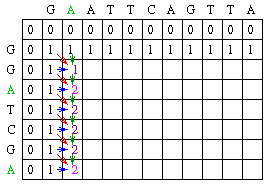


Now the last phase in dynamic programming:
3) Tracing back
Tracing back almost always begins with the highest score and looks to the diagonal up or to the left(gap in sequence-1) or up (gap in seq -2)


 This tracing gives an alignment:
G A A T T C A G T T A
| | | | | |
G G A T - C - G - - A
 OR
OR
G - A A T T C A G T T A
| | | | | |
G G A - - T C - G - - A
For longer sequences large number of other combination is possible, but the dynamic programming outputs only one result.
[Ref: Images adapted from Eric C. Rouchka's web page]
In real life examples, different penalty scores are given for a mismatch and for a gap[Every time, you go down the columns or on a row without a match should be given a penalty as a gap]
In mathematics and computer science, dynamic programming is a method for solving complex problems by breaking them down into simpler steps. It is applicable to problems exhibiting the properties of overlapping subproblems which are only slightly smaller[1] and optimal substructure (described below). When applicable, the method takes far less time than naïve methods.
Top-down dynamic programming simply means storing the results of certain calculations, which are later used again since the completed calculation is a sub-problem of a larger calculation. Bottom-up dynamic programming involves formulating a complex calculation as a recursive series of simpler calculations.
In biological sequence analysis, dynamic programming is often used for sequence alignment using global sequence alignment(Needleman and Wunsch method).
Here I present a simplest interpretation of dynamic programming for aligning two sequences using global alignment(N&W method).
We have sequence 1: G A A T T C A G T T A
sequence 2: G G A T C G A
Here;
Length(seq1) = 11 and Length(seq2) = 7; lets call them k and l
In order to align them globally using dynamic programming method, we have to do the following;
1. Build a matrix M of size (k+1) X (l+1), putting seq1 in columns and seq2 in columns
2. Initialize the matrix where M[0,0..k] and M[0..l,0] is initialized into zero[Fig -1].
Fig - 1
The rest of the rows and columns can be filled using the following mathematical notation:
Mi,j = MAXIMUM[
     Mi-1, j-1 + Si,j (match/mismatch in the diagonal),
     Mi,j-1 + w (gap in sequence #1),
     Mi-1,j + w (gap in sequence #2)]
where Si,j is 1 for a match and 0 for a mismatch
w = 0
Now, lets talk about filling M(1,1) = MAX[ {M(0,0) + S(1,1)}, {M(1,0) + W}, {M(0,1) + W} ] = MAX[ {0 + 1}, {0 + 0}, {0+0} ]= 1
Going by this trend, M[1,2] is going to be: Max[{1+0},{0+0},{0+0} ] = 1So, we can start filling in the matrix this way:
From this, a common observation can be drawn:
1. Increment by one the value of a cell only when there is a perfect match to
that of the previous diagonal.
2. If there is a mismatch always continue with the value from the previous column/row.
Going by this, we can end up filling the matrix with the following values:
Now the last phase in dynamic programming:
3) Tracing back
Tracing back almost always begins with the highest score and looks to the diagonal up or to the left(gap in sequence-1) or up (gap in seq -2)
G A A T T C A G T T A
| | | | | |
G G A T - C - G - - A
G - A A T T C A G T T A
| | | | | |
G G A - - T C - G - - A
For longer sequences large number of other combination is possible, but the dynamic programming outputs only one result.
[Ref: Images adapted from Eric C. Rouchka's web page]
In real life examples, different penalty scores are given for a mismatch and for a gap[Every time, you go down the columns or on a row without a match should be given a penalty as a gap]
Friday, November 05, 2010
Generating random DNA/protein sequence permutation
In general terminology, sequence permutation is defined as shuffling of the bases without disturbing the base composition. In other words, all the permuted sequence should have the same base composition.It is fairly easy to implement such permutations when we talk about single nucleotide composition; and Fisher and Yates 1938, algorithm is a good one for implementing it without introducing much sequence bias. However, in real life situation, it may be necessary to generate a random DNA sequence where there is a need to preserve the di-tri nucleotide frequencies in overlapping windows.Altschul SF, Erickson BW., have explained how to generate such a sequence while conserving the di-tri nucleotide composition using a graph theory of generating random Eulerian walks on a directed multigraph. [Paper Here]
R has a bioString object with DNAString function, that although does not implement Fisher Yates algorithm, but generates non-biased permuted DNA string. For dinucleotide/trinucleotide composition preservation also, this method can be used effectively as long as they don't overlap:
Example Code:
>library(Biostrings)
> x <- paste(sample(c("A", "C", "G", "T"), 1000, replace=TRUE,prob=c(0.2, 0.55
, 0.1, 0.15)), collapse="")
> x <- DNAString(x)
>x # will print x
> alphabetFrequency(x,baseOnly=TRUE) # Will print base composition in numbers
In order to run it for di/tri nucleotide, just change the code slightly into:
> x <- paste(sample(c("AT", "CC", "GT", "TA", "AA"), 1000, replace=TRUE,prob=c(0.2, 0.55
, 0.1, 0.10,0.05)), collapse="")
> x<-DNAString(x)
> x
2000-letter "DNAString" instance
seq: CCATCCCCCCCCTAATCCTATACCTATACCTACCGT...CCATATTATATACCTAATAACCCCCCTACCATCCAT
Please NOTE: Here you will not get any other dinucleotide than specified IN FRAME
Same can be done for tri-tetra nucleotides as well.
A very simple unix implementation of random sequence generator could be:
$echo {a,t,g,c}{a,t,g,c}{a,t,g,c}{a,t,g,c}
This generates a cross product of a,t,g,c to a,t,g,c, and thus has all tetra nucleotides represented. Similar order can be generated for dinucleotides such as:
$echo {aa,tt,gg,cc}{at,tg,ga,ca}{aa,tc,ag,tc}{aa,at,cg,cc}
Enjoy generating permuted sequences.
R has a bioString object with DNAString function, that although does not implement Fisher Yates algorithm, but generates non-biased permuted DNA string. For dinucleotide/trinucleotide composition preservation also, this method can be used effectively as long as they don't overlap:
Example Code:
>library(Biostrings)
> x <- paste(sample(c("A", "C", "G", "T"), 1000, replace=TRUE,prob=c(0.2, 0.55
, 0.1, 0.15)), collapse="")
> x <- DNAString(x)
>x # will print x
> alphabetFrequency(x,baseOnly=TRUE) # Will print base composition in numbers
In order to run it for di/tri nucleotide, just change the code slightly into:
> x <- paste(sample(c("AT", "CC", "GT", "TA", "AA"), 1000, replace=TRUE,prob=c(0.2, 0.55
, 0.1, 0.10,0.05)), collapse="")
> x<-DNAString(x)
> x
2000-letter "DNAString" instance
seq: CCATCCCCCCCCTAATCCTATACCTATACCTACCGT...CCATATTATATACCTAATAACCCCCCTACCATCCAT
Please NOTE: Here you will not get any other dinucleotide than specified IN FRAME
Same can be done for tri-tetra nucleotides as well.
A very simple unix implementation of random sequence generator could be:
$echo {a,t,g,c}{a,t,g,c}{a,t,g,c}{a,t,g,c}
This generates a cross product of a,t,g,c to a,t,g,c, and thus has all tetra nucleotides represented. Similar order can be generated for dinucleotides such as:
$echo {aa,tt,gg,cc}{at,tg,ga,ca}{aa,tc,ag,tc}{aa,at,cg,cc}
Enjoy generating permuted sequences.
Wednesday, November 03, 2010
Some unix/perl oneliners for Bioinformatics
1 File format conversion/line counting/counting number of files etc.
1. $ wc –l : count number of lines in a file.
2. $ ls | wc –l : count number of files in a directory.
3. $ tac : print the file in reverse order e.g; last line first, first line last.
4. $ rev : reverse the file in lines.
5. $ sed 's/.$//' or sed 's/^M$//' or sed 's/\x0D$//' : converts a dos file into unix mode.
6. $sed "s/$/`echo -e \\\r`/" or sed 's/$/\r/' or sed "s/$//": converts a unix newline into a DOS newline.
7. $ awk '1; { print "" }' : Double space a file.
8. $ awk '{ total = total + NF }; END { print total+0 }' : prints the number of words in a file.
9. $sed '/^$/d' or [grep ‘.’] : Delete all blank lines in a file.
10. $sed '/./,$!d' : Delete all blank lines in the beginning of the file.
11. $sed -e :a -e '/^\n*$/{$d;N;ba' -e '}': Delete all blank lines at the end of the file.
12. $sed -e :a -e 's/<[^>]*>//g;/
13. $sed 's/^[ \t]*//' : deleting all leading white space tabs in a file.
14. $ sed 's/[ \t]*$//' : Delete all trailing white space and tab in a file.
15. $ sed 's/^[ \t]*//;s/[ \t]*$//' : Delete both leading and trailing white space and tab in a file.
2.2 Working with Patterns/numbers in a sequence file
16. $awk '/Pattern/ { n++ }; END { print n+0 }' : print the total number of lines containing the word pattern.
17. $sed 10q : print first 10 lines.
18. $sed -n '/regexp/p' : Print the line that matches the pattern.
19. $sed '/regexp/d' : Deletes the lines that matches the regexp.
20. $sed -n '/regexp/!p' : Print the lines that does not match the pattern.
21. $sed '/regexp/!d' : Deletes the lines that does NOT match the regular expression.
22. $sed -n '/^.\{65\}/p' : print lines that are longer than 65 characters.
23. $sed -n '/^.\{65\}/!p' : print lines that are lesser than 65 characters.
24. $sed -n '/regexp/{g;1!p;};h' : print one line before the pattern match.
25. $sed -n '/regexp/{n;p;}' : print one line after the pattern match.
26. $sed -n '/^.\{65\}/ {g;1!p;};h' < sojae_seq > tmp : print the names of the sequences that are larger than 65 nucleotide long.
27. $sed -n '/regexp/,$p' : Print regular expression to the end of file.
28. $sed -n '8,12p' : print line 8 to 12(inclusive)
29. $sed -n '52p' : print only line number 52.
30. $seq ‘/pattern1/,/pattern2/d’ < inputfile > outfile : will delete all the lines between pattern1 and pattern2.
31. $sed ‘/20,30/d’ < inputfile > outfile : will delete all lines between 20 and 30. OR sed ‘/20,30/d’ < input > output will delete lines between 20 and 30.
32. awk '/baz/ { gsub(/foo/, "bar") }; { print }' : Substitute foo with bar in lines that contains ‘baz’.
33. awk '!/baz/ { gsub(/foo/, "bar") }; { print }' : Substitute foo with bar in lines that does not contain ‘baz’.
34. grep –i –B 1 ‘pattern’ filename > out : Will print the name of the sequence and the sequence having the pattern in a case insensitive way(make sure the sequence name and the sequence each occupy a single line).
35. grep –i –A 1 ‘seqname’ filename > out : will print the sequence name as well as the sequence into file ‘out’.
2.3 Inserting Data into a file:
36. gawk --re-interval 'BEGIN{ while(a++<49) s=s "x" }; { sub(/^.{6}/,"&" s) }; 1' > fileout : will insert 49 ‘X’ in the sixth position of every line.
37. gawk --re-interval 'BEGIN{ s="YourName" }; { sub(/^.{6}/,"&" s) }; 1' : Insert your name at the 6 th position in every line.
3. Working with Data Files[Tab delimited files]:
3.1 Error Checking and data handling:
38. awk '{ print NF ":" $0 } ' : print the number of fields of each line followed by the line.
39. awk '{ print $NF }' : print the last field of each line.
40. awk 'NF > n' : print every line with more than ‘n’ fields.
41. awk '$NF > n' : print every line where the last field is greater than n.
42. awk '{ print $2, $1 }' : prints just first 2 fields of a data file in reverse order.
43. awk '{ temp = $1; $1 = $2; $2 = temp; print }' : prints all the fields in the correct order except the first 2 fields.
44. awk '{ for (i=NF; i>0; i--) printf("%s ", $i); printf ("\n") }' : prints all the fields in reverse order.
45. awk '{ $2 = ""; print }' : deletes the 2nd field in each line.
46. awk '$5 == "abc123"' : print each line where the 5th field is equal to ‘abc123’.
47. awk '$5 != "abc123"' : print each line where 5th field is NOT equal to abc123.
48. awk '$7 ~ /^[a-f]/' : Print each line whose 7th field matches the regular expression.
49. awk '$7 !~ /^[a-f]/' : print each line whose 7th field does NOT match the regular expression.
50. cut –f n1,n2,n3.. > output file : will cut n1,n2,n3 columns(fields) from input file and print the output in output file. If delimiter is other than TAB then give additional argument such as cut –d ‘,’ –f n1,n2.. inputfile > out
51. sort –n –k 2,2 –k 4,4 file > fileout : Will conduct a numerical sort of column 2, and then column 4. If –n is not specified, then, sort will do a lexicographical sort(of the ascii value).
4. Miscellaneous:
52. uniq –u inputfile > out : will print only the uniq lines present in the sorted input file.
53. uniq –d inputfile > out : will print only the lines that are in doubles from the sorted input file.
54. cat file1 file2 file3 … fileN > outfile : Will concatenate files back to back in outfile.
55. paste file1 file2 > outfile : will merge two files horizontally. This function is good for merging with same number of rows but different column width.
56. !:p : will print the previous command run with the ‘pattern’ in it.
57. !! : repeat the last command entered at the shell.
58. ~ : Go back to home directory
59. echo {a,t,g,c}{a,t,g,c}{a,t,g,c}{a,t,g,c} : will generate all tetramers using ‘atgc’. If you want pentamers/hexamers etc. then just increase the number of bracketed entities.NOTE: This is not a efficient sequence shuffler. If you wish to generate longer sequences then use other means.
60. kill -HUP ` ps -aef | grep -i firefox | sort -k 2 -r | sed 1d | awk ' { print $2 } ' ` : Kills a hanging firefox process.
61. csplit -n 7 input.fasta '/>/' '{*}' : will split the file ‘input.fasta’ wherever it encounters delimiter ‘>’. The file names will appear as 7 digit long strings.
62. find . -name data.txt –print: finds and prints the path for file data.txt.
Sample Script to make set operations on sequence files:
63. grep ‘>’ filenameA > list1 # Will list just the sequence names in a file names.
grep ‘>’ filenameB > list2 # Will list names for file 2
cat list1 list2 > tmp # concatenates list1 and list2 into tmp
sort tmp > tmp1 # File sorted
uniq –u tmp1 > uniq # AUB – A ∩ B (OR (A-B) U (B-A))
uniq –d tmp1 > double # Is the intersection (A ∩ B)
cat uniq double > Union # AUB
cat list1 double > tmp
sort tmp | uniq –u > list1uniq # A - B
cat list2 double > tmp
sort tmp | uniq –u > list2uniq # B - A
PERL ONELINERS:
1. perl -pe '$\="\n"' : double space a file
2. perl -pe '$_ .= "\n" unless /^$/' : double space a file except blank lines
3. perl -pe '$_.="\n"x7' : 7 space in a line.
4. perl -ne 'print unless /^$/' : remove all blank lines
5. perl -lne 'print if length($_) < 20' : print all lines with length less than 20.
6. perl -00 -pe '' : If there are multiple spaces, delete all leaving one(make the file a single spaced file).
7. perl -00 -pe '$_.="\n"x4' : Expand single blank lines into 4 consecutive blank lines
8. perl -pe '$_ = "$. $_"': Number all lines in a file
9. perl -pe '$_ = ++$a." $_" if /./' : Number only non-empty lines in a file
10. perl -ne 'print ++$a." $_" if /./' : Number and print only non-empty lines in a file
11. perl -pe '$_ = ++$a." $_" if /regex/' ; Number only lines that match a pattern
12. perl -ne 'print ++$a." $_" if /regex/' : Number and print only lines that match a pattern
13. perl -ne 'printf "%-5d %s", $., $_ if /regex/' : Left align lines with 5 white spaces if matches a pattern (perl -ne 'printf "%-5d %s", $., $_' : for all the lines)
14. perl -le 'print scalar(grep{/./}<>)' : prints the total number of non-empty lines in a file
15. perl -lne '$a++ if /regex/; END {print $a+0}' : print the total number of lines that matches the pattern
16. perl -alne 'print scalar @F' : print the total number fields(words) in each line.
17. perl -alne '$t += @F; END { print $t}' : Find total number of words in the file
18. perl -alne 'map { /regex/ && $t++ } @F; END { print $t }' : find total number of fields that match the pattern
19. perl -lne '/regex/ && $t++; END { print $t }' : Find total number of lines that match a pattern
20. perl -le '$n = 20; $m = 35; ($m,$n) = ($n,$m%$n) while $n; print $m' : will calculate the GCD of two numbers.
21. perl -le '$a = $n = 20; $b = $m = 35; ($m,$n) = ($n,$m%$n) while $n; print $a*$b/$m' : will calculate lcd of 20 and 35.
22. perl -le '$n=10; $min=5; $max=15; $, = " "; print map { int(rand($max-$min))+$min } 1..$n' : Generates 10 random numbers between 5 and 15.
23. perl -le 'print map { ("a".."z",”0”..”9”)[rand 36] } 1..8': Generates a 8 character password from a to z and number 0 – 9.
24. perl -le 'print map { ("a",”t”,”g”,”c”)[rand 4] } 1..20': Generates a 20 nucleotide long random residue.
25. perl -le 'print "a"x50': generate a string of ‘x’ 50 character long
26. perl -le 'print join ", ", map { ord } split //, "hello world"': Will print the ascii value of the string hello world.
27. perl -le '@ascii = (99, 111, 100, 105, 110, 103); print pack("C*", @ascii)': converts ascii values into character strings.
28. perl -le '@odd = grep {$_ % 2 == 1} 1..100; print "@odd"': Generates an array of odd numbers.
29. perl -le '@even = grep {$_ % 2 == 0} 1..100; print "@even"': Generate an array of even numbers
30. perl -lpe 'y/A-Za-z/N-ZA-Mn-za-m/' file: Convert the entire file into 13 characters offset(ROT13)
31. perl -nle 'print uc' : Convert all text to uppercase:
32. perl -nle 'print lc' : Convert text to lowercase:
33. perl -nle 'print ucfirst lc' : Convert only first letter of first word to uppercas
34. perl -ple 'y/A-Za-z/a-zA-Z/' : Convert upper case to lower case and vice versa
35. perl -ple 's/(\w+)/\u$1/g' : Camel Casing
36. perl -pe 's|\n|\r\n|' : Convert unix new lines into DOS new lines:
37. perl -pe 's|\r\n|\n|' : Convert DOS newlines into unix new line
38. perl -pe 's|\n|\r|' : Convert unix newlines into MAC newlines:
39. perl -pe '/regexp/ && s/foo/bar/' : Substitute a foo with a bar in a line with a regexp.
Some other Perl Tricks
Want to display some progress bars while perl does your job:
For this perl provides a nice utility called "pipe opens" ('perldoc -f open' will provide more info)
1. $ wc –l
2. $ ls | wc –l : count number of files in a directory.
3. $ tac
4. $ rev
5. $ sed 's/.$//' or sed 's/^M$//' or sed 's/\x0D$//' : converts a dos file into unix mode.
6. $sed "s/$/`echo -e \\\r`/" or sed 's/$/\r/' or sed "s/$//": converts a unix newline into a DOS newline.
7. $ awk '1; { print "" }' : Double space a file.
8. $ awk '{ total = total + NF }; END { print total+0 }' : prints the number of words in a file.
9. $sed '/^$/d' or [grep ‘.’] : Delete all blank lines in a file.
10. $sed '/./,$!d' : Delete all blank lines in the beginning of the file.
11. $sed -e :a -e '/^\n*$/{$d;N;ba' -e '}': Delete all blank lines at the end of the file.
12. $sed -e :a -e 's/<[^>]*>//g;/
13. $sed 's/^[ \t]*//' : deleting all leading white space tabs in a file.
14. $ sed 's/[ \t]*$//' : Delete all trailing white space and tab in a file.
15. $ sed 's/^[ \t]*//;s/[ \t]*$//' : Delete both leading and trailing white space and tab in a file.
2.2 Working with Patterns/numbers in a sequence file
16. $awk '/Pattern/ { n++ }; END { print n+0 }' : print the total number of lines containing the word pattern.
17. $sed 10q : print first 10 lines.
18. $sed -n '/regexp/p' : Print the line that matches the pattern.
19. $sed '/regexp/d' : Deletes the lines that matches the regexp.
20. $sed -n '/regexp/!p' : Print the lines that does not match the pattern.
21. $sed '/regexp/!d' : Deletes the lines that does NOT match the regular expression.
22. $sed -n '/^.\{65\}/p' : print lines that are longer than 65 characters.
23. $sed -n '/^.\{65\}/!p' : print lines that are lesser than 65 characters.
24. $sed -n '/regexp/{g;1!p;};h' : print one line before the pattern match.
25. $sed -n '/regexp/{n;p;}' : print one line after the pattern match.
26. $sed -n '/^.\{65\}/ {g;1!p;};h' < sojae_seq > tmp : print the names of the sequences that are larger than 65 nucleotide long.
27. $sed -n '/regexp/,$p' : Print regular expression to the end of file.
28. $sed -n '8,12p' : print line 8 to 12(inclusive)
29. $sed -n '52p' : print only line number 52.
30. $seq ‘/pattern1/,/pattern2/d’ < inputfile > outfile : will delete all the lines between pattern1 and pattern2.
31. $sed ‘/20,30/d’ < inputfile > outfile : will delete all lines between 20 and 30. OR sed ‘/20,30/d’ < input > output will delete lines between 20 and 30.
32. awk '/baz/ { gsub(/foo/, "bar") }; { print }' : Substitute foo with bar in lines that contains ‘baz’.
33. awk '!/baz/ { gsub(/foo/, "bar") }; { print }' : Substitute foo with bar in lines that does not contain ‘baz’.
34. grep –i –B 1 ‘pattern’ filename > out : Will print the name of the sequence and the sequence having the pattern in a case insensitive way(make sure the sequence name and the sequence each occupy a single line).
35. grep –i –A 1 ‘seqname’ filename > out : will print the sequence name as well as the sequence into file ‘out’.
2.3 Inserting Data into a file:
36. gawk --re-interval 'BEGIN{ while(a++<49) s=s "x" }; { sub(/^.{6}/,"&" s) }; 1'
37. gawk --re-interval 'BEGIN{ s="YourName" }; { sub(/^.{6}/,"&" s) }; 1' : Insert your name at the 6 th position in every line.
3. Working with Data Files[Tab delimited files]:
3.1 Error Checking and data handling:
38. awk '{ print NF ":" $0 } ' : print the number of fields of each line followed by the line.
39. awk '{ print $NF }' : print the last field of each line.
40. awk 'NF > n' : print every line with more than ‘n’ fields.
41. awk '$NF > n' : print every line where the last field is greater than n.
42. awk '{ print $2, $1 }'
43. awk '{ temp = $1; $1 = $2; $2 = temp; print }' : prints all the fields in the correct order except the first 2 fields.
44. awk '{ for (i=NF; i>0; i--) printf("%s ", $i); printf ("\n") }' : prints all the fields in reverse order.
45. awk '{ $2 = ""; print }' : deletes the 2nd field in each line.
46. awk '$5 == "abc123"' : print each line where the 5th field is equal to ‘abc123’.
47. awk '$5 != "abc123"' : print each line where 5th field is NOT equal to abc123.
48. awk '$7 ~ /^[a-f]/' : Print each line whose 7th field matches the regular expression.
49. awk '$7 !~ /^[a-f]/' : print each line whose 7th field does NOT match the regular expression.
50. cut –f n1,n2,n3..
51. sort –n –k 2,2 –k 4,4 file > fileout : Will conduct a numerical sort of column 2, and then column 4. If –n is not specified, then, sort will do a lexicographical sort(of the ascii value).
4. Miscellaneous:
52. uniq –u inputfile > out : will print only the uniq lines present in the sorted input file.
53. uniq –d inputfile > out : will print only the lines that are in doubles from the sorted input file.
54. cat file1 file2 file3 … fileN > outfile : Will concatenate files back to back in outfile.
55. paste file1 file2 > outfile : will merge two files horizontally. This function is good for merging with same number of rows but different column width.
56. !
57. !! : repeat the last command entered at the shell.
58. ~ : Go back to home directory
59. echo {a,t,g,c}{a,t,g,c}{a,t,g,c}{a,t,g,c} : will generate all tetramers using ‘atgc’. If you want pentamers/hexamers etc. then just increase the number of bracketed entities.NOTE: This is not a efficient sequence shuffler. If you wish to generate longer sequences then use other means.
60. kill -HUP ` ps -aef | grep -i firefox | sort -k 2 -r | sed 1d | awk ' { print $2 } ' ` : Kills a hanging firefox process.
61. csplit -n 7 input.fasta '/>/' '{*}' : will split the file ‘input.fasta’ wherever it encounters delimiter ‘>’. The file names will appear as 7 digit long strings.
62. find . -name data.txt –print: finds and prints the path for file data.txt.
Sample Script to make set operations on sequence files:
63. grep ‘>’ filenameA > list1 # Will list just the sequence names in a file names.
grep ‘>’ filenameB > list2 # Will list names for file 2
cat list1 list2 > tmp # concatenates list1 and list2 into tmp
sort tmp > tmp1 # File sorted
uniq –u tmp1 > uniq # AUB – A ∩ B (OR (A-B) U (B-A))
uniq –d tmp1 > double # Is the intersection (A ∩ B)
cat uniq double > Union # AUB
cat list1 double > tmp
sort tmp | uniq –u > list1uniq # A - B
cat list2 double > tmp
sort tmp | uniq –u > list2uniq # B - A
PERL ONELINERS:
1. perl -pe '$\="\n"'
2. perl -pe '$_ .= "\n" unless /^$/' : double space a file except blank lines
3. perl -pe '$_.="\n"x7' : 7 space in a line.
4. perl -ne 'print unless /^$/' : remove all blank lines
5. perl -lne 'print if length($_) < 20' : print all lines with length less than 20.
6. perl -00 -pe '' : If there are multiple spaces, delete all leaving one(make the file a single spaced file).
7. perl -00 -pe '$_.="\n"x4' : Expand single blank lines into 4 consecutive blank lines
8. perl -pe '$_ = "$. $_"': Number all lines in a file
9. perl -pe '$_ = ++$a." $_" if /./' : Number only non-empty lines in a file
10. perl -ne 'print ++$a." $_" if /./' : Number and print only non-empty lines in a file
11. perl -pe '$_ = ++$a." $_" if /regex/' ; Number only lines that match a pattern
12. perl -ne 'print ++$a." $_" if /regex/' : Number and print only lines that match a pattern
13. perl -ne 'printf "%-5d %s", $., $_ if /regex/' : Left align lines with 5 white spaces if matches a pattern (perl -ne 'printf "%-5d %s", $., $_' : for all the lines)
14. perl -le 'print scalar(grep{/./}<>)' : prints the total number of non-empty lines in a file
15. perl -lne '$a++ if /regex/; END {print $a+0}' : print the total number of lines that matches the pattern
16. perl -alne 'print scalar @F' : print the total number fields(words) in each line.
17. perl -alne '$t += @F; END { print $t}' : Find total number of words in the file
18. perl -alne 'map { /regex/ && $t++ } @F; END { print $t }' : find total number of fields that match the pattern
19. perl -lne '/regex/ && $t++; END { print $t }' : Find total number of lines that match a pattern
20. perl -le '$n = 20; $m = 35; ($m,$n) = ($n,$m%$n) while $n; print $m' : will calculate the GCD of two numbers.
21. perl -le '$a = $n = 20; $b = $m = 35; ($m,$n) = ($n,$m%$n) while $n; print $a*$b/$m' : will calculate lcd of 20 and 35.
22. perl -le '$n=10; $min=5; $max=15; $, = " "; print map { int(rand($max-$min))+$min } 1..$n' : Generates 10 random numbers between 5 and 15.
23. perl -le 'print map { ("a".."z",”0”..”9”)[rand 36] } 1..8': Generates a 8 character password from a to z and number 0 – 9.
24. perl -le 'print map { ("a",”t”,”g”,”c”)[rand 4] } 1..20': Generates a 20 nucleotide long random residue.
25. perl -le 'print "a"x50': generate a string of ‘x’ 50 character long
26. perl -le 'print join ", ", map { ord } split //, "hello world"': Will print the ascii value of the string hello world.
27. perl -le '@ascii = (99, 111, 100, 105, 110, 103); print pack("C*", @ascii)': converts ascii values into character strings.
28. perl -le '@odd = grep {$_ % 2 == 1} 1..100; print "@odd"': Generates an array of odd numbers.
29. perl -le '@even = grep {$_ % 2 == 0} 1..100; print "@even"': Generate an array of even numbers
30. perl -lpe 'y/A-Za-z/N-ZA-Mn-za-m/' file: Convert the entire file into 13 characters offset(ROT13)
31. perl -nle 'print uc' : Convert all text to uppercase:
32. perl -nle 'print lc' : Convert text to lowercase:
33. perl -nle 'print ucfirst lc' : Convert only first letter of first word to uppercas
34. perl -ple 'y/A-Za-z/a-zA-Z/' : Convert upper case to lower case and vice versa
35. perl -ple 's/(\w+)/\u$1/g' : Camel Casing
36. perl -pe 's|\n|\r\n|' : Convert unix new lines into DOS new lines:
37. perl -pe 's|\r\n|\n|' : Convert DOS newlines into unix new line
38. perl -pe 's|\n|\r|' : Convert unix newlines into MAC newlines:
39. perl -pe '/regexp/ && s/foo/bar/' : Substitute a foo with a bar in a line with a regexp.
Some other Perl Tricks
Want to display some progress bars while perl does your job:
For this perl provides a nice utility called "pipe opens" ('perldoc -f open' will provide more info)
open(my $file, '-|', 'command','option', 'option', ...) or die "Could not run tar ... - $!";
  while (<$file>) {
       print "-";
  }
  print "\n";
  close($file);
Will print - on the screen till the process is completed
Subscribe to:
Posts (Atom)